Life Hacks

How to Work
From Home and
Win the Day

Tips for working remotely without missing a beat.

A lady in an apartment leaning over a desk and writing something on a piece of paper on a clipboard

Working from home is a privilege for those who can do their jobs independent of location. That’s not to say that remote work doesn’t come with its own challenges. So, how do you set yourself up for success? Whether you’re joining the mobile workforce for the long haul or adjusting to a temporary WFH situation, here are some ways to get the most out of your workday.​

A birds-eye view of a lady sitting at a desk and using Samsung’s DeX Station to make working remotely a breeze
TIP

Schedule working hours and personal hours, then enforce them just like your boss would.

1

Be mobile and able

Since you’ll be working from home, you’ll need a device that’s powerful enough to recreate your in-office productivity. Hook up your Galaxy S20 to a tool like Samsung DeX, which brings you a desktop experience powered by your phone.

TIP

Schedule working hours and personal hours, then enforce them just like your boss would.

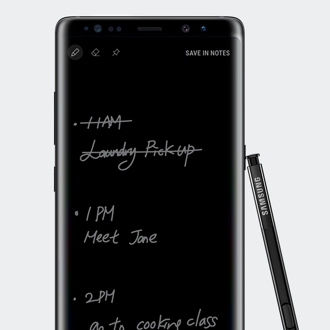
An over-the-shoulder shot of someone scheduling tasks on a Galaxy Note10 to master time management
2

Stay on cycle

When you’re remote, good time management is crucial. Try breaking your day into productivity cycles: 15 minutes of work, then 5 minutes of break. Repeat that four times, then take a 20-minute break. Add a note-taking app like Samsung Notes and you’ll plow through your to-do list.

Woman connecting with her team via a video call to remotely work from home
3

Check in with your team

Make the extra effort to send your boss a mid-day update on your progress and use Google Duo to video chat with your teammates to be sure you didn’t miss any conversations that affect your projects. Not only will this keep you connected to your work, it will also give you the face-to-face interaction you may crave when you’re working from home.

A side shot of a persons arm hovering over a desk as though they are about to write something, the monitor on the table shows the New York skyline
4

Boost your productivity

Make sure you've got the right equipment to get the job done. A mobile PC like the Galaxy Book S gives you the power and performance you need to work from anywhere so that you can take your productivity to the next level. Set yourself up for even more success by tidying and organizing your workspace. An accessory like the Space Monitor folds flat against the wall and even clamps onto the side of your desk, so you can free up precious desk real estate to work more efficiently.

A profile shot of a man wearing a white Galaxy Buds+ earbud in his right ear
5

Stay sane with wireless

Working from home doesn’t mean you need to be tied to your desk. Wireless earbuds like the Galaxy Buds+ let you get up and move around freely when on a conference call—perfect for getting those steps in. Plus, with two mics that pick up your voice and preserve it against background noise, you can simply speak without having to shout over whoever is at home with you.

Overhead shot of a man at a desk gaming on a curved monitor
6

Work hard, chill hard

Without setting some serious work-life boundaries, you run the risk of sacrificing your playtime and veering toward burnout. So, strike some balance. A daily walk around the block can do wonders for avoiding that cabin-fever feeling. Once your workday is over, settle in for an epic and truly immersive gaming experience with one of Samsung’s curved monitors. Built for both work and fun, they let you slip right into playtime without switching screens.

Go big even at home

Bring your Galaxy S20 and Note10 to the big screen with Samsung Dex and multitask like a boss.

Back views of a Cloud Pink Galaxy S20, a Cloud Blue Galaxy 20+ and a Cosmic Grey Galaxy S20 Ultra 5G overlapping each other, the products are shown from side to side with the S20 on the bottom left
Front-facing shot of an upright Galaxy Note10 with an S Pen leaning on the side of it
An orange box with rounded edges with the word "Dex" is in white type overlayed on top of it

Galaxy S20 | S20+ | S20 Ultra 5G

LEARN MORE

Galaxy Note10 | Note10+

LEARN MORE

Samsung DeX

LEARN MORE

Read these stories next


UI of the actual product may be different.
Microsoft Office requires users to purchase licenses.
Microsoft Word and Microsoft PowerPoint require a download to use.