How to use the personalised Running coach feature on your Galaxy Watch8 and Watch8 Classic
To use the personalised Running coach on your Galaxy Watch8 or Galaxy Watch8 Classic, you need to complete a running level test first. After the test, the watch creates a personalised training plan based on your performance.
The Running coach feature analyses your running data and provides a structured training plan with post-run feedback through the Samsung Health app.

What is the personalised Running coach on Galaxy Watch8?
The personalised Running coach on Galaxy Watch8 and Galaxy Watch8 Classic evaluates your running ability and recommends a tailored training plan.
- Your running level is measured using indicators such as heart rate, VO₂max, distance, and pace
- A 12-minute running test determines your level (from 1 to 10)
- Based on your result, a personalised plan is selected from multiple training programmes
How to start using Running coach on Galaxy Watch8
Follow these steps to set up and use the personalised Running coach:
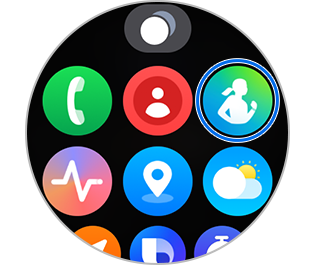
Step 1. Open Samsung Health on your Galaxy Watch
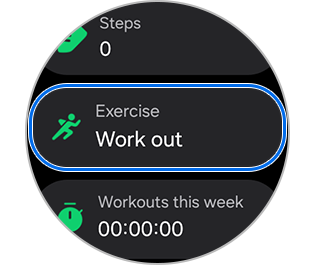
Step 2. Tap Exercise
Step 3. Swipe and select Running coach
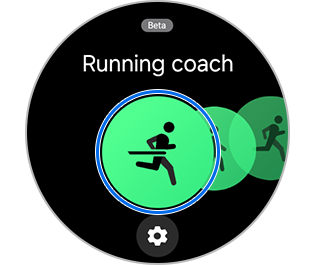
Step 4. Tap Find your running level and follow the on-screen instructions
Step 5. Complete the 12-minute running test
Step 6. View your personalised training plan after the test finishes


Test result


Training plan
Notes:
- You must run continuously for 12 minutes to complete the level test
- After the test, rate the difficulty on a 10-point scale to finalise your level
- You can reset the Running coach:
Samsung Health > Running coach > Training plan > Test again - Device menus and screens may vary depending on model and software version
- Image is simulated and actual UI may differ
Thank you for your feedback!
Please answer all questions.